Website maintenance for Australian tradies
What website maintenance does a tradie actually need?
Keep the site safe, accurate and ready for enquiries. Skip the vague package that cannot show what was checked.
Direct answer
A tradie website needs four kinds of upkeep. Keep the domain, hosting and HTTPS live. Apply security updates and keep a usable backup where the platform requires them. Test the calls and enquiries that create work. Update business facts when services, areas, hours, prices or terms change. A large monthly SEO package is not automatic. The right plan names each task, its owner, its trigger and the proof you receive.
Site care is not one job. It is not the same for each site. A hosted site with no plugins has less code to patch than a WordPress site with a theme, forms and third-party tools. A one-page referral site may also change less than a site that posts new work, prices and offers each week.
Do not start with, “How many hours should I buy?” Ask what could stop a client from finding, trusting or calling the firm. Then give each check to you, the host or the web team.
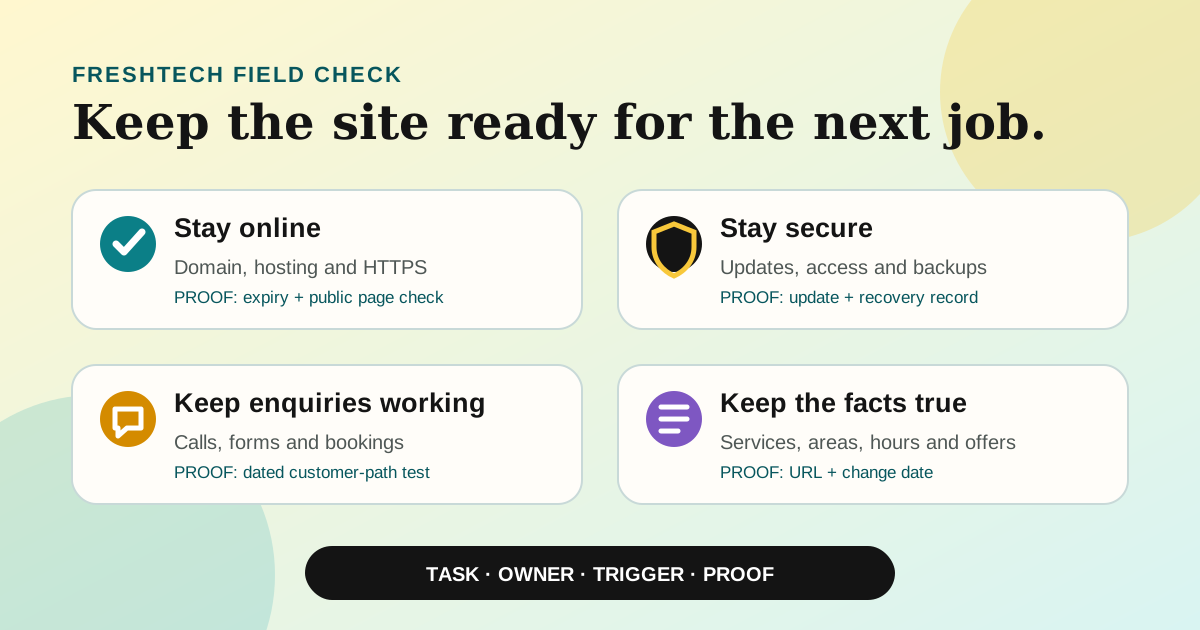
Start with four outcomes, not a package name
| Outcome | What can go wrong | Useful proof |
|---|---|---|
| Stay online | The domain expires, hosting fails or HTTPS stops working. | Renewal owner, current contact details, expiry dates and a successful public-page check. |
| Stay secure | Old software, weak admin access or a failed backup leaves the site exposed. | Update record, access review and a backup that has been tested or restored in a safe place. |
| Keep enquiries working | A tap-to-call link, form, booking link or notification breaks silently. | A dated test showing where the enquiry arrived and what the customer saw. |
| Keep facts accurate | Old services, areas, hours, staff, prices or policies send the wrong promise. | A change log and the public URL where each new fact appears. |
The Australian Cyber Security Centre backs MFA for site admin, tight access, domain renewal, HTTPS, backups, code updates and checks for odd changes. It also tells you to ask the host how often it backs up data and where it keeps those files.
Those are goals. They do not mean each site needs the same weekly plan. A safety patch can start an update. Facts should change when the firm changes. Call and form paths need a set check because they can fail with no clear sign.
Split your work from the web team's work
You should not need to patch a server. The web team should not decide if you still offer urgent call-outs. A clear split stops both gaps.
You keep the trade facts true
- Services and work areas. Remove work you no longer want. Add a new trade only when you can do it. Keep the site and Google Business Profile in step.
- Hours and contact paths. Fix holiday closures, after-hours rules, phone numbers, email and booking links.
- Prices, offers and terms. Remove old offers. Check that “from” prices, what is in the job, deposits and cancellation text still match real work.
- Proof. Fix old staff facts, licences, group marks, job photos and claims when they stop being true. Do not leave an old staff member shown as the main contact.
- Call and form tests. Make one test call and send one form or booking. Check that the client note and staff alert both arrive.
The host or web team keeps the site sound
- Safety updates. Patch the CMS, theme, plugins, server and code used by the site. The time should match the risk and vendor alert. It should not wait for a neat monthly report.
- Backups and restore. Know what is saved, how often, how long it is kept and who can bring it back. A backup claim is weak when no one knows how to restore it.
- Uptime and HTTPS. Watch key public pages and the site lock. Log each outage and what fixed it.
- Admin access. Remove people who no longer need it. Keep MFA on high-level accounts. Make sure the firm owns the way back in.
- Code change checks. After a release, test the page, layout, form, site stats, main URL and any search setting that changed.
If you need help with that work, compare the control and site care in each choice. Our DIY website builder versus web professional guide splits the build price from the work that comes next.
Use triggers plus a simple routine
The table below is a FreshTech start point. It is not an Australian law or Google rule. Change it for the site, call load and risk of your work.
| When | Check | Record |
|---|---|---|
| When the business changes | Work, areas, hours, contact facts, prices, terms, staff and proof. | Changed page, date and approver. |
| When a safety or code update appears | Risk, backup, patch, key client path and rollback route. | Version or release, result and any follow-up. |
| Each month | Open key pages on a phone. Test call, form and booking paths. Look for odd changes. | URLs tested, device, result and owner. |
| Each quarter | Admin access, due dates, backup proof, bad links, Search Console flags and speed trend. | Exceptions, repair owner and due date. |
| Before a domain or host bill is due | Name holder, pay method, contact email, due date and right to hold the name. | Proof of renew kept by the firm. |
One week can have three types of work
Sam runs a small plumbing firm. On Monday, he stops roof work and adds drain work. He tells the web team that day. They fix two pages, test the form and log the change. That is change-led care.
On Tuesday, the host sends a patch alert. The web team takes a backup, runs the patch, checks the site and logs the result. That is risk-led care. At month end, Sam calls his own number and sends the form. Both work. No page edit is due. That is a set check.
Three jobs had three triggers. A fixed pile of weekly tasks would hide that fact.
auDA says you should renew a .au name before it ends. This helps avoid site or email down time and the risk that another person who meets the rules gets the name. Keep the contact and pay method right. Do not let an old staff member or web firm get the sole due-date note. Our Australian tradie domain guide covers the end, name holder and control checks.
Test the client path before you chase more traffic
A site can load and still lose the job. Test the path a real client uses:
- Open the homepage on a phone using mobile data. Confirm the trade, area and next step are clear without zooming.
- Tap the phone number. Confirm it opens the correct number, especially after a business or staff change.
- Send a real form. Check key fields, the sent note, inbox, spam folder and any CRM or alert.
- Follow the book or quote link. Check that the work, free time, price or request state fits the real path.
- Check a key service page. Make sure the offer, area, proof and call to action are still useful and truthful.
Keep test data small. If the site takes client data, use the OAIC small firm checklist to see if the Privacy Act covers you. Some small firms are covered even when sales are $3 million or less. Do not treat that sum as a broad way out. This guide is not legal advice.
Tie search checks to real changes
Google says Googlebot must be able to reach the page. The page must return a good HTTP code and have text that can go in Search. Those are base rules. They do not ensure the page will be in the index or rank.
After a real page change, check the title, one main heading, canonical URL, internal links and sitemap entry. Use Search Console to inspect an important URL or investigate a reported issue. Do not change the sitemap date every week when the page did not materially change.
Our Google indexing guide splits a live page from a page Google has found, read, stored and ranked. The Google AI Search guide for tradies covers clear trade facts, page data and public proof. Site care keeps that base true. It does not make trust from thin air.
Watch the trend, not one speed score
Google's Core Web Vitals cover load speed, how fast a page reacts and how much it jumps. Search Console groups real use data when it has enough. Use that report and the same test each time. Look for a bad trend after an image, script or design change.
One lab score can shift with the phone, link and test set-up. Log the page, tool, date and set-up. Fix a real fault first: a slow main image, a late button or text that jumps as a person tries to tap it.
What should a paid care plan prove?
Ask for a one-page scope. It should name the site, task lead and help path. It should also answer these points:
- What is watched? Key pages, forms, bookings, HTTPS, domain, backups, code or safety alerts.
- What starts the work? A set check, vendor alert, failed test, outage or your request.
- What is in the plan? Patches, small text changes, restore work, help time and what is out.
- Who controls the accounts? You should know the domain name holder, host, site stats, Search Console and admin way back in.
- What proof comes back? A dated result, not just “work done”. Failed checks need a person and due date.
- How does the plan end? Site copy, handover, last backup, account move and loss of web firm access.
Red flag: a report lists plugin updates but never tests if a client can call, send a form or book. The code changed. No one checked the job path.
Before you pay for a new build, use our tradie website acceptance checklist. It covers control, phone use, trust, data, site stats and handover. This page starts once that handover is done.
Common questions
Does a small tradie website need maintenance every month?
It needs a sound plan, but not each task must run each month. Call and form checks suit a set date. Safety patches follow alerts and risk. Trade facts change when your work changes. A static hosted site may need less code work than a CMS full of plugins.
Can I maintain the website myself?
You can own true facts, call and form tests, due dates and account notes. Code patches, safe backups and restore work may need the host or web team. Put the split in writing so a key job is not lost between both sides.
Is website maintenance the same as SEO?
No. Site care keeps the site live, safe and true. SEO can include research, new pages, code fixes, site stats and trust work. Some tasks cross over. A patch report is not proof of a higher rank.
Does a backup prove the website can be recovered?
No. It proves a copy exists. You must know what is in it, where it sits, who can reach it and if the restore steps work. Ask when the team last ran a safe restore test.
What should I check first today?
Open the site on your phone. Tap the phone number. Send one test enquiry. Then confirm who controls the domain and when it renews. Those checks catch four expensive failures without buying a new package first.
Make the maintenance job visible
Create one row for each important task: check, owner, trigger, last result and proof. Start with the domain, homepage, main service page, call link and enquiry form.
If nobody can name the owner or show the last result, that is the first gap to fix. Read all FreshTech guides, see who operates FreshTech or ask FreshTech for a website maintenance check.
Ask for a maintenance checkSources
- Australian Cyber Security Centre: Secure your website, updated 29 July 2024; accessed 18 August 2026.
- auDA: How to renew your .au domain name, accessed 18 August 2026.
- Google Search Central: Google Search technical requirements, updated 18 December 2025; accessed 18 August 2026.
- Google Search Central: Understanding Core Web Vitals and Google search results, updated 10 December 2025; accessed 18 August 2026.
- Office of the Australian Information Commissioner: Small business, accessed 18 August 2026.