Google indexing time in Australia
How long does Google take to index a new website?
A live website is not automatically in Google. Use this guide to tell a normal delay from a crawl block, duplicate or technical fault.
Direct answer
Google gives no guaranteed indexing time. Its current guide says a crawl can take from a few days to a few weeks. A Search Console request may finish sooner. It can also take longer. It does not guarantee inclusion. Wait is only one part of the answer. First check whether Google can find, crawl and choose the correct page.
Important: indexed does not mean highly ranked. An indexed page is eligible to appear. It may still sit too low to notice for a broad or competitive search.
When an owner asks, “How long does Google take to index a new website?”, start with the exact URL. A browser can show that the page is live. Search Console can show Google's last view. The sitemap can show that the page was offered for discovery. None of those checks can promise a rank.
For example, a clean report can be short. The page loads. Google may crawl it. Indexing is allowed. The chosen canonical is correct. Add the request date. That small record is more useful than a broad claim that “Google is not working”.
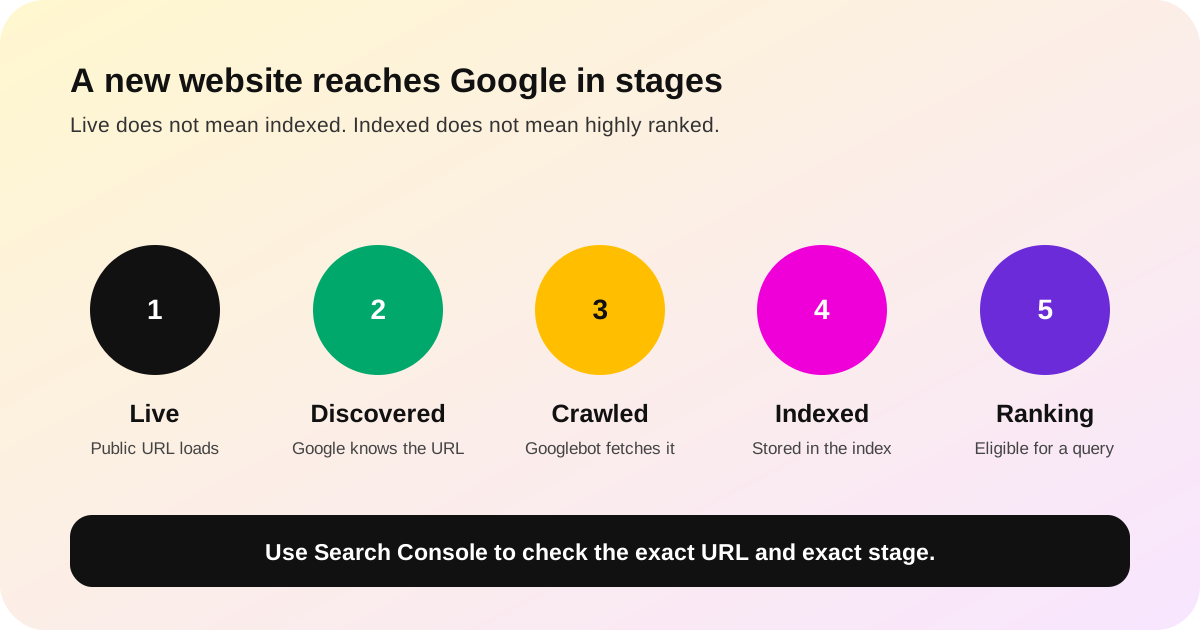
Know which Google stage you are checking
Owners often say a site is not on Google when they mean one of several things. The fix changes with the stage. A page cannot be diagnosed from a normal search alone.
| Stage | What it means | Best check |
|---|---|---|
| Live | A person can open the public URL without a login or error. | Open the exact URL in a private browser window. |
| Discovered | Google knows the URL exists through a link, sitemap or earlier crawl. | Check URL Inspection and the Page indexing report. |
| Crawled | Googlebot fetched the page or tried to fetch it. | Read the crawl date, response and crawl permission in URL Inspection. |
| Indexed | Google processed the page and stored a chosen version in its index. | Read the indexed verdict and Google-selected canonical. |
| Ranking | The indexed page is shown for a query at a position Google chooses. | Use the Search results Performance report, not a single manual search. |
A site: search can be a quick clue, but Google says it does not always return every indexed URL. Use Search Console for the page-level answer.
Run this seven-step Google indexing check
- Open the exact public URL. Test the full address in a private window. A login, broken redirect, server error or missing page must be fixed before waiting for Google.
- Inspect that URL in Search Console. Paste the canonical address into URL Inspection. Read Google's stored verdict before running a live test. The two views answer different questions.
- Check whether crawling is allowed. If the result says crawling is blocked by
robots.txt, inspect the rule for that path. Do not remove a block until you know whether the page is meant to be public. - Check whether indexing is allowed. Look for a
noindextag or response header. A live test can show the current rule even when Google's stored copy is older. - Compare the canonical URLs. Your declared canonical and Google's selected canonical should point to the page you want indexed. A different selection can mean Google treats your page as a duplicate.
- Check the sitemap and internal links. List only preferred public URLs in the sitemap. Link to the page from a useful hub or related page. Update
lastmodonly after a real content, schema or link change. - Request indexing once, then record the date. Request indexing for an important new or corrected URL. Repeating the request does not make crawling faster. Recheck the same evidence after a reasonable wait.
This is also a good website handover check. A supplier should be able to show the public URL, canonical, index rule, sitemap entry and working internal link. Our tradie website acceptance checklist covers the wider handover and account checks.
Keep one dated evidence record
Write the exact URL and the date beside each check. Save the stored inspection verdict, the live-test result, the declared canonical, Google's selected canonical and the latest crawl date. Record when the page entered the sitemap and which public page links to it.
This stops two common mistakes. The first is fixing an old condition that Google has already cleared. The second is asking a web provider to “do more SEO” without naming the failed stage. A dated record turns a vague complaint into a small job: remove one block, correct one canonical, repair one response or wait for the submitted page to be processed.
Use the same record after a change. Test the live URL first. Then request indexing once and note the request date. When Google returns, compare the new crawl date and verdict with the earlier evidence. Do not use a fresh screenshot of a normal search as proof that the technical fault remains.
Example: one new page and one old blocked URL
A plumber adds a new hot-water service page. The page loads for anyone. It has a clear title and one main heading. The service hub links to it. The sitemap lists the same URL. The page also points to itself as the canonical version.
The live test says Google can crawl and index it. The owner sends one request and notes the date. Two days later, the page is still not in a normal search. That fact alone does not show a fault. The clean test and recent date support a short wait.
The same site has an old preview URL. Search Console says it is indexed but blocked by robots.txt. The owner opens that exact sample. It is not the new service page. It is a stale preview that should not be in Search.
Those two URLs need different work. The new service page needs time and a later check. The old preview needs a clear removal plan. A broad request to “fix Google” would mix both jobs and hide the real facts.
Read the status message before changing the site
The Page indexing report groups URLs by reason. Not every excluded URL is a fault. Google says the goal is to index the canonical version of each important page, not every duplicate or alternate address.
| Message or situation | What to check next | Do not assume |
|---|---|---|
| URL is unknown to Google | Add it to the correct sitemap, link to it from an indexed page and request indexing. | Do not assume the page is broken. |
| Discovered, currently not indexed | Confirm the page is useful, distinct, internally linked and technically available. | Do not publish copies to make the queue look bigger. |
| Crawled, currently not indexed | Check whether the page duplicates another page or adds too little distinct value. | Do not assume another crawl request will fix the content. |
| Duplicate; Google chose a different canonical | Compare content, redirects, canonical tags, sitemap URLs and internal links. | Do not force both versions into the index. |
| Indexed, though blocked by robots.txt | Decide whether the URL should be public. If yes, remove the matching crawl block and test it. If no, use the correct removal or noindex process after allowing Google to see that instruction. |
Do not assume the whole website is blocked. Open the affected URL sample. |
Google explains that it can sometimes index a URL without reading its content when robots.txt blocks the crawl. That is why “indexed, though blocked” can appear. The notice is about the listed URLs, not automatic proof that every page on the domain is unavailable.
Help Google find the right page without shortcuts
A sitemap is a discovery aid. It is not an order to index and it does not improve rank by itself. Google recommends full canonical URLs in the file. It also says an accurate lastmod should reflect a significant update, not a routine date change.
Internal links do a second job. They help a visitor reach the new page and help a crawler understand where it belongs. Link a new guide from the main guide hub. Add one link from a genuinely related page. Avoid hundreds of near-identical pages made only to catch town or trade variations.
For a local business, keep the website facts aligned with the real business identity and Google Business Profile. Our service-area Business Profile guide explains the setup for businesses without a customer-facing shopfront. Our Google AI Search guide for tradies covers crawlable business facts and structured data.
Be careful with services that promise instant Google indexing for normal business pages. Google's Indexing API is limited to pages with eligible job-posting or livestream markup. It is not the normal submission path for a plumber's homepage or a new service guide.
When should an Australian business act?
Act now when the page returns an error or needs a login. Act when a rule blocks it or it declares noindex. Fix a wrong canonical. Add the page to its intended sitemap and hub. Waiting does not repair those faults.
Wait and monitor when the live test is clean, the canonical is correct, the page is useful and distinct, and the request is recent. Google's current recrawl guidance gives a broad range of a few days to a few weeks. Search Console also says new content may take a few days to index. Neither statement is a deadline.
If an important page is still excluded after that broad window, read the current reason again. The reason may have changed after a fresh crawl. Fix the cause shown now, not the message copied into an old email.
Once the page is indexed, move to performance. Check which queries produce impressions and whether the page answers them. A new website may be indexed before it has enough relevance or authority to rank for a broad phrase. No website builder, agency or indexing request can guarantee a top Google position.
Common questions
Does submitting a sitemap guarantee Google will index my website?
No. A sitemap helps Google discover preferred URLs. Google says it is still a hint, not a guarantee of crawling or indexing. Keep it accurate and include only the canonical public pages you want in Search.
Should I request indexing for every page?
Use URL Inspection for a small number of important new or corrected pages. For many pages, Google recommends a sitemap. Do not keep resubmitting the same URL. That does not make it move faster.
Can my website rank before it is indexed?
No. The page needs to be in Google's index before it can appear as that page in normal Search results. Indexing only makes it eligible. The query, page quality, competition and other ranking systems decide whether people see it.
Does “indexed, though blocked by robots.txt” mean my website cannot be found?
Not necessarily. It means Google knows an affected URL but a robots rule blocked its crawler from reading that page. Check the sample URL and rule. Other allowed pages may still be crawled and indexed.
Do I need a large website before Google can index it?
No. A small site can be indexed. Each important page still needs a clear purpose, public access and a path from another useful page or sitemap. Start with the smallest site you can keep correct. See our guide on whether every tradie needs a website.
Ask for evidence, not an indexing promise
Pick one important URL. Record its live response, index rule, canonical, sitemap entry, internal link and Search Console verdict. That gives you a real fault to fix or a dated reason to wait.
If a supplier cannot show those six items, ask before paying for more posts or pages. You can also read all FreshTech guides, check who operates FreshTech or compare the current Alice plans.
See all FreshTech guidesSources
- Google Search Central: Ask Google to recrawl your URLs, accessed 15 August 2026.
- Google Search Console Help: URL Inspection tool, accessed 15 August 2026.
- Google Search Console Help: Page indexing report, accessed 15 August 2026.
- Google Search Central: Build and submit a sitemap, accessed 15 August 2026.
- Google Search Central: Get your website on Google, accessed 15 August 2026.
- Google Search Central: Crawling and indexing FAQ, accessed 15 August 2026.
- Google Search Central: How to use the Indexing API, accessed 15 August 2026.