DIY website builder vs web designer for tradies
Website builder vs web designer: which should a tradie choose?
Choose the person who can own the whole job, not just the first draft. A website still needs clear content, checks, account control and ongoing care after it goes live.
Direct answer
Use a DIY website builder when the site is simple. A named person in the business must own the work. They need time to write, build, test and maintain it. Hire a web professional when the goal, content or setup is more complex. Hire one too when nobody can own those jobs. A managed service can sit between the two. The right choice leaves the trade business in control. That control covers its domain, accounts, content and next update.
Start with the work, not the tool. The weakest way to choose is to compare one advertised price with another. Website packages can include very different work. One may give you a template and a login. Another may include planning, writing, search setup, forms, hosting and ongoing changes.
This guide does not give a “typical” market price. Those figures change. They can also hide the main question. Who will do each job? What will the firm own? What happens after launch?
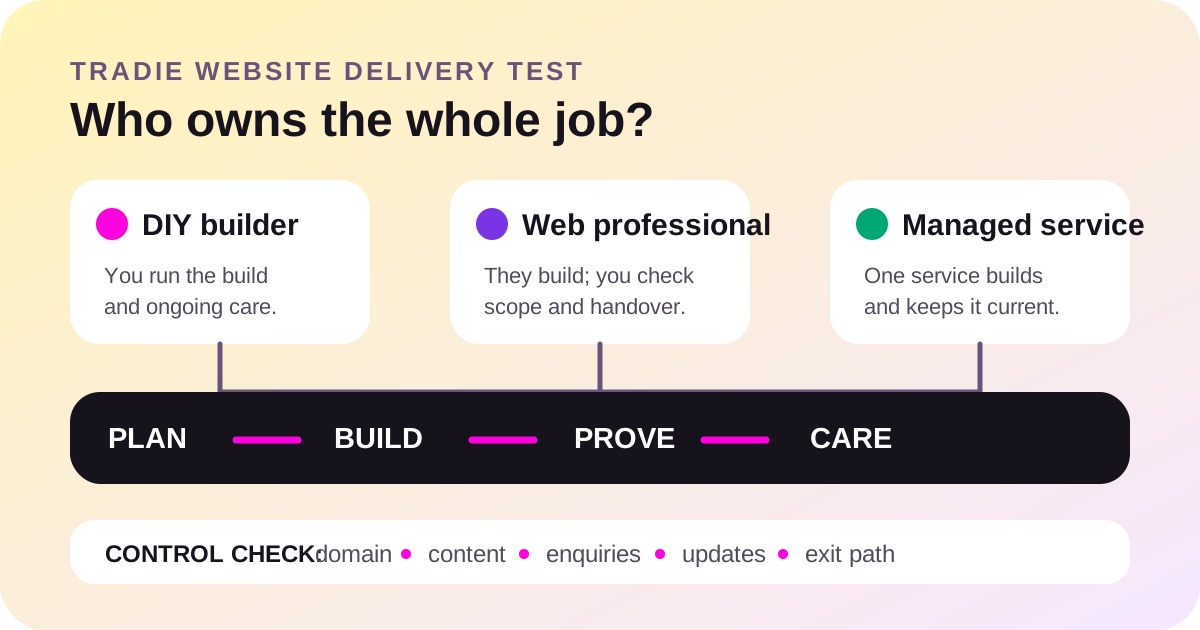
Website builder vs web designer: quick comparison
| Option | Best fit | You still need to own | Main risk |
|---|---|---|---|
| DIY builder | A small, clear site with a capable person who has time to run it. | Goals, words, photos, setup, testing, updates and security. | The first draft goes live, but upkeep has no owner. |
| One-off professional | A firm that needs custom help now and can manage the result later. | The brief, approvals, accurate proof, handover and future changes. | The package ends at launch and the firm cannot safely change it. |
| Managed service | A firm that wants setup and ongoing changes handled under one service. | Business facts, approvals, account access and service expectations. | The contract hides limits, ownership or the exit path. |
None of the three options is always best. A basic site for a new sole trader is one job. A site linked to booking, quoting and customer systems is another.
The four jobs every website needs
A builder tool handles part of the build. A designer handles part or all of the visual work. A developer may handle code and integrations. These labels do not tell you who owns the whole result.
Split the website into four jobs before you compare offers:
- Plan. Name the customer, service area and action you want. Decide which services need their own clear section or page. Gather the real business name, contact details, licences, service limits and proof you can publish.
- Build. Write useful words. Choose real images. Set up the pages, menus, forms, domain, mobile layout, privacy details and any booking or quote path. Keep the content in visible page text, not only inside pictures.
- Prove. Test the site on a phone. Send each form. Check calls and emails reach the right person. Confirm the title, description, canonical address, crawlable links and sitemap. Check that each public claim is true.
- Care. Renew the domain. Update the platform and plugins. Keep backups. Remove old staff, services and offers. Add new proof when the firm has it. Fix broken links and check enquiries still arrive.
The Australian Government says to set website goals first. It also separates cloud content systems, self-hosted systems and a custom designer. A cloud system can make editing easier. A self-hosted system can offer more control, but it brings more setup and maintenance. The tool does not remove the work.
When a DIY website builder makes sense
DIY can be a sound choice when the scope stays small. It works best when one person is willing to be the site owner inside the business.
- The firm needs a small site with a home page, core services, service area, proof and contact path.
- The business already has clear words and real photos it can use.
- Someone can learn the platform and finish the details, not just choose a template.
- That person can test forms, phone links, mobile layout and account recovery.
- The firm can keep the site, domain, backups and security settings current.
- There is no complex booking, payment, customer or quoting integration to build.
DIY is not free. Count the owner’s time, platform plan, domain, images and later fixes. That does not make it a bad option. It means time and responsibility belong in the comparison.
Do not treat a polished template as a finished website. A template cannot know the firm’s service limits, proof, customer questions or enquiry process. It also cannot decide who checks renewals and updates next year.
When hiring a web professional makes sense
Bring in a professional when the work is beyond the time or skill inside the firm. That may mean a designer, developer, writer, search specialist or a small team. Ask what each person actually does.
Outside help becomes more useful when:
- The firm serves several customer groups or has many services to explain.
- The site must connect to booking, payments, quoting, customer records or another system.
- Old pages or domains must move without losing useful links and content.
- Accessibility, performance, security or custom functions need deeper work.
- Nobody in the business can write, build and test the site in a reasonable way.
- The site already earns enquiries and a careless rebuild could damage that path.
A professional does not remove the firm’s role. The owner must still check each claim. The firm must provide real proof and set the enquiry path. It should also keep direct control of the domain and main accounts.
What a managed website service changes
A managed service can cover setup and ongoing care. This may suit a tradie who wants one team to make each change. The owner does not need to log in and edit the site.
The trade-off is the contract. Check what the monthly service includes. Ask how many changes are covered. Ask who hosts the site and controls the domain. Check how backups work and how you leave. Easy setup is useful only when the firm can still recover its assets and move later.
FreshTech sells website services, so we are not a neutral supplier in that choice. Our buyer-side rule stays the same: compare the work, ownership and exit path before comparing the headline fee. See the current FreshTech options and inclusions, then ask the same questions of every provider.
A seven-step choice before you spend
- Write the goal in one line. Examples are better-fit calls, clearer proof or fewer repeated questions. “Have a modern website” is not a business goal.
- List the public facts. Record the real services, locations, hours, licences, contact paths and proof the site must show.
- Mark the complex parts. Note migrations, booking, payments, forms, customer systems, member areas or custom calculators.
- Name the internal owner. If you choose DIY, write the person’s name beside plan, build, prove and care. Do not use “we” as the owner.
- Ask professionals for scope. Get a list of pages, writing, images, setup, testing, revisions, handover, hosting and ongoing work. Compare like with like.
- Check control before signing. The firm should know who holds the domain, platform, analytics, search, forms and recovery access.
- Choose the smallest option that covers the real job. Do not buy custom code for a simple brochure site. Do not force a basic builder to carry a complex business process.
Website ownership and handover checklist
| Area | Evidence to keep | Red flag |
|---|---|---|
| Domain | Registrant details, registrar login, renewal date and recovery method. | Only the builder can renew or recover it. |
| Website | Platform login, hosting terms, backup method and export or exit path. | The firm cannot get a copy or move without an unknown fee. |
| Content | Approved words, image rights and a record of claims and sources. | Stock work is presented as the firm’s job or proof. |
| Enquiries | A real test of forms, calls, emails and any booking path. | A thank-you screen appears, but no enquiry arrives. |
| Search setup | Search Console access, sitemap address, page titles and canonical checks. | The provider promises a position but will not show the setup. |
| Ongoing care | A named owner, update schedule, support boundary and exit process. | Nobody is responsible after the launch invoice. |
Use our full tradie website acceptance checklist before final payment. It covers mobile use, public proof, privacy, search setup and tested enquiries.
Once the delivery model is clear, decide what customers should see before they enquire. Use our guide to choose fixed prices, ranges, from-prices or quote-only website copy without pretending every job has the same scope.
Does the choice affect Google or AI search?
Google does not rank a site because it used a DIY builder or a designer. Search systems see the finished pages and how they work. Google asks site owners to make pages secure, fast and easy to use on all devices. It also needs links it can crawl. Key facts must appear in text it can read.
A DIY tool can produce that result. A professional can also produce a slow, unclear site. Check the output, not the badge on the supplier’s website.
For search and AI recommendations, keep the business facts clear and consistent. Show the real name, services, service area, contact path and evidence. Link important pages through normal navigation. Do not hide the main answer inside an animation or image. Use our guide on helping Google AI and ChatGPT find a trade business for the discovery setup.
No builder, designer or agency can guarantee a Google ranking or an AI recommendation. Google says there is no secret that will automatically rank a site first. Useful changes may also take time to be noticed.
Common questions
Is a website builder good enough for a tradie?
Yes, when the site is small and someone can own the words, setup, testing and care. The builder must still produce a clear mobile page, working contact path and business-controlled accounts.
What is the difference between a web designer and a developer?
A designer usually focuses on layout, visual systems and how people move through the page. A developer builds or changes the technical parts. Some people do both. Ask for the exact deliverables instead of relying on the job title.
Should the provider write the website copy?
Only if writing is in the scope and the firm checks every claim. A provider can shape clear copy. The trade business must confirm services, areas, licences, photos, offers and proof are accurate.
Can I start DIY and hire someone later?
Yes. Keep the domain and platform accounts under business control. Choose a system with a clear export or transfer path. Record any paid themes, plugins and image rights so the next person knows what can move.
Who should maintain the website?
Name one owner. It may be a staff member, provider or managed service. That person needs a clear list covering updates, backups, domain renewal, content changes and enquiry tests.
Does paying more guarantee a better site?
No. Compare the brief, deliverables, proof, account control, care and exit path. A high fee can still hide a weak scope. A small site can still do its job well.
Choose the owner before the tool
Put a name beside plan, build, prove and care. If one person inside the firm can do all four, DIY may fit. If not, buy the missing help with a clear handover and exit path.
Still deciding whether a site is worth the effort? Start with does every tradie need a website? If the answer is yes, protect the address with our Australian tradie domain guide.
See all FreshTech guidesSources
- Australian Government: Set up a business website, accessed 10 August 2026.
- Australian Signals Directorate: Small Business Cyber Security Guide, accessed 10 August 2026.
- Google Search Central: Get started with Search, accessed 10 August 2026.
- Google Search Central: SEO Starter Guide, accessed 10 August 2026.