Tradie website speed Australia
How fast should an Australian tradie website load?
Use three real measures and test the call path before you pay.
Direct answer
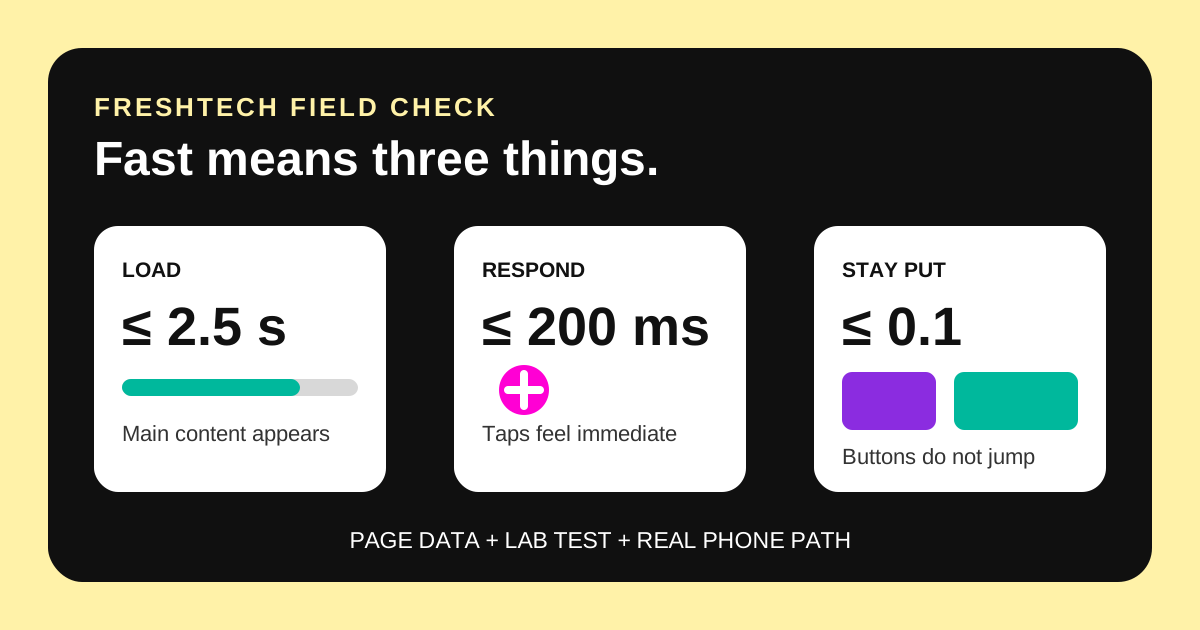
Do not accept one made-up “full load” number as proof. For a tradie website, aim for Google's current “good” Core Web Vitals: Largest Contentful Paint at or below 2.5 seconds, Interaction to Next Paint at or below 200 milliseconds, and Cumulative Layout Shift at or below 0.1. When enough real-user data exists, all three should be good at the 75th percentile. Then open the site on an ordinary phone and make sure a buyer can see the service, call and send a quote request without waiting, guessing or tapping a moving button.
A green score is useful. It is not the whole job. A site can score well in one lab run but feel poor on an older phone. A new site can have no real-user report yet. A fast home page can also lead to a slow quote form.
This tradie website speed Australia guide separates those cases. It gives you a plain acceptance test for the pages that win or lose the enquiry.
There is no honest single website load time
“Under three seconds” sounds clear. The problem is that it hides what was measured. One tool may stop when the main photo appears. Another may wait for every script. A third may test from an overseas data centre on a simulated phone.
A real buyer also has a device, network and task. Priya may open an electrician's page on a budget phone in a car park. She needs the phone number. Mark may open it on home Wi-Fi and tap through a gallery before asking for a quote. Their useful finish lines are different.
Google's Core Web Vitals avoid one vague finish line. They measure three parts of the experience: when the main content appears, how quickly the page reacts, and whether the layout jumps.
Use the current Core Web Vitals thresholds
The current “good” thresholds below come from web.dev and PageSpeed Insights. They use the same limit on mobile and desktop.
| Measure | Good threshold | Simple tradie example |
|---|---|---|
| Largest Contentful Paint (LCP) | 2.5 seconds or less | The main service heading or job photo appears without a long blank wait. |
| Interaction to Next Paint (INP) | 200 milliseconds or less | The menu, phone link or quote button reacts quickly after a tap. |
| Cumulative Layout Shift (CLS) | 0.1 or less | A late photo, font or banner does not push the call button away as the buyer taps. |
Field data judges these at the 75th percentile. In plain terms, the report looks beyond the easy visits. A page passes the Core Web Vitals assessment only when its available LCP, INP and CLS results are all good.
Do not turn the table into a promise that every visit will match one number. Devices and networks vary. The thresholds are a shared quality target, not a guarantee about one person's phone.
Field data and a lab score answer different questions
Google PageSpeed Insights can show two kinds of evidence. Keep both, but do not mix them up.
| Evidence | What it tells you | Limit |
|---|---|---|
| Field data | How real Chrome visitors experienced the page or site over the previous 28-day period. | A new or low-traffic page may not have enough samples. The report may fall back to the whole site or show no field data. |
| Lab data | How one simulated Lighthouse run behaved. It gives useful repair clues. | It is one controlled run, not a history of Australian customers on their own phones. |
| Your phone test | Whether the real service, call and quote path works on a device and connection your buyers may use. | One phone is not a full performance audit. Repeat it on more than one connection. |
PageSpeed says its mobile lab run simulates a mid-tier phone and mobile network. The data centre can be in North America, Europe or Asia. That is still useful for finding a heavy image or blocking script. It is not the same as a customer opening the site in Melbourne.
The Australian Competition and Consumer Commission also measures web page loading as a separate broadband quality measure. In its final 2026 program, fixed wireless tests across eight Australian-based pages averaged 3.2 seconds. That is not a target for your site. It is a reminder that the connection affects the result too.
Run this three-part speed test before final payment
Test the live production URL, not just a builder's local screen. Use the home page, one important service page and the quote or booking path.
- Record the official report. Open each URL in PageSpeed Insights. Save the date, mobile result, field-data scope and Core Web Vitals status. If field data is missing, write “not enough data”. Do not replace that fact with a guess.
- Test an ordinary phone. Turn off office Wi-Fi and use a normal mobile connection. Open a private tab so an old cache does not hide the first visit. Tap the menu, call link and quote button. Send one marked test enquiry.
- Repeat under a second condition. Try another phone or slower connection. Watch for the main content, delayed taps and moving buttons. Record the fault, page and time. Ask for repair proof, then repeat the same path.
Keep the test simple. You are checking whether the website helps a buyer act. You are not trying to become a performance engineer.
Speed must not hide or break the controls that people need. Use the separate tradie website accessibility test to check keyboard, zoom, form and motion basics as well.
Check the customer path, not only the home page
A home page can be light while the next step is slow. Builders may optimise the demo page and forget the parts added by another tool.
- Service page: the job name, area and main proof appear before a large gallery or video.
- Call action: the phone link is visible, stable and ready to tap. A late banner does not cover it.
- Quote form: fields respond, errors appear quickly and the submit button does not freeze.
- Booking tool: the third-party screen loads on a phone and does not add a long blank stage.
- Proof: job photos are sized for the screen. The browser does not fetch a full camera file for a small card.
The tradie job-photo guide explains what useful proof looks like. Keep the proof, but serve the right file size. Do not delete the photos that help a buyer judge the work just to chase 100.
Fix the biggest delay before polishing the score
Start where the buyer waits or mis-taps. The PageSpeed lab report can point to the likely cause. Your developer still needs to check the live page.
| What you see | Common place to inspect | Proof after repair |
|---|---|---|
| Main content appears late | Large first image, video, font, server response or blocking style and script files. | New mobile lab run plus the same phone path on a cold visit. |
| Tap feels dead | Too much script work, a busy third-party widget or a control waiting on a network call. | Button state changes at once and INP field data improves when enough visits accrue. |
| Button or text jumps | Images without set dimensions, late fonts, ads, cookie bars or injected booking tools. | Screen recording shows the action stays in place and CLS is good. |
Do not sign off a repair based on “cache cleared” or “plugin installed”. Ask what changed, which page was tested and what the before-and-after evidence shows.
Put the speed proof in the website handover
A builder cannot promise future field data for a brand-new site. They can still provide a sound launch record.
- URLs: list the home, main service and enquiry paths tested.
- Date and mode: note mobile or desktop, field or lab, and the PageSpeed test date.
- Field-data scope: write whether the numbers cover the exact URL, the whole origin or no available sample.
- Core measures: record LCP, INP and CLS rather than only the large performance score.
- Phone path: record the device, connection and whether call and enquiry tasks worked.
- Change rule: retest after a new gallery, video, form, booking tool, theme, plugin or tracking script.
Add this record to normal tradie website maintenance. Speed can change after launch even when the design looks the same.
Questions tradies ask about website speed
Does a tradie website have to load in under three seconds?
There is no single official full-load rule for every page and buyer. Use the current Core Web Vitals thresholds, then test the actual customer task on a normal phone. State what the tool measured.
Is a 90 or 100 PageSpeed performance score required?
No. PageSpeed calls a Lighthouse score of 90 or more good, but the score is lab data. Check the individual diagnostics and real-user Core Web Vitals when available. Do not remove useful content just to chase a perfect number.
Why does PageSpeed show no real-user data?
The page may be new or have too few eligible Chrome visits in the 28-day collection period. PageSpeed may use origin-level data or show no field result. That is missing evidence, not a pass or fail.
Will good Core Web Vitals put my tradie website at the top of Google?
No. Google says Core Web Vitals are used by its ranking systems, but good reports do not guarantee top rankings. Helpful, relevant content still matters. Treat speed as customer experience and technical quality, not a ranking trick.
What should I test before paying a website builder?
Test the home, service and enquiry paths in PageSpeed Insights and on a normal phone. Save the field-data scope, lab result and task outcome. Then use the full tradie website acceptance checklist for ownership, privacy, search and enquiry proof.
Ask for evidence, not one big green number
Save the three URLs and results. Run the call and quote path. If a fault blocks the buyer, fix it and repeat the same test before final payment.
For a plain buyer-side review, ask FreshTech Community.
See all FreshTech guidesSources
- web.dev: How the Core Web Vitals metrics thresholds were defined, updated 7 May 2025 and viewed 28 August 2026.
- Google for Developers: About PageSpeed Insights, viewed 28 August 2026.
- Google Search Central: Understanding page experience in Google Search results, updated 10 December 2025 and viewed 28 August 2026.
- Australian Competition and Consumer Commission: Broadband performance data, updated June 2026 and viewed 28 August 2026.
Note: FreshTech Community made this guide from current official sources. It does not promise a Google rank, lead count, sale, universal load time or future field result. It contains no paid link, fake review, copied competitor wording or invented data.