Tradie website photos Australia
What photos should a tradie put on their website?
Show the job clearly. Protect the client. Keep the proof in your hands.
Direct answer
Use real photos that show the job before, during and after the work. For clear tradie website photos, start with the wide site view and the fault. Show one detail, the end result and a scale or team view. Get a clear yes before you shoot or post. Remove faces, number plates, house numbers, keys, papers and screens unless they have been cleared. Add a short, true caption. Say what the job was, not where the client lives.
A good job photo helps a buyer answer one key point: “Have these people done work like mine?” It should not turn a client’s home, name or private details into an ad.
The aim is not to fill a page. Build a small set of clear proof. Each image needs a job, a consent note and enough context for the next person to place it well.
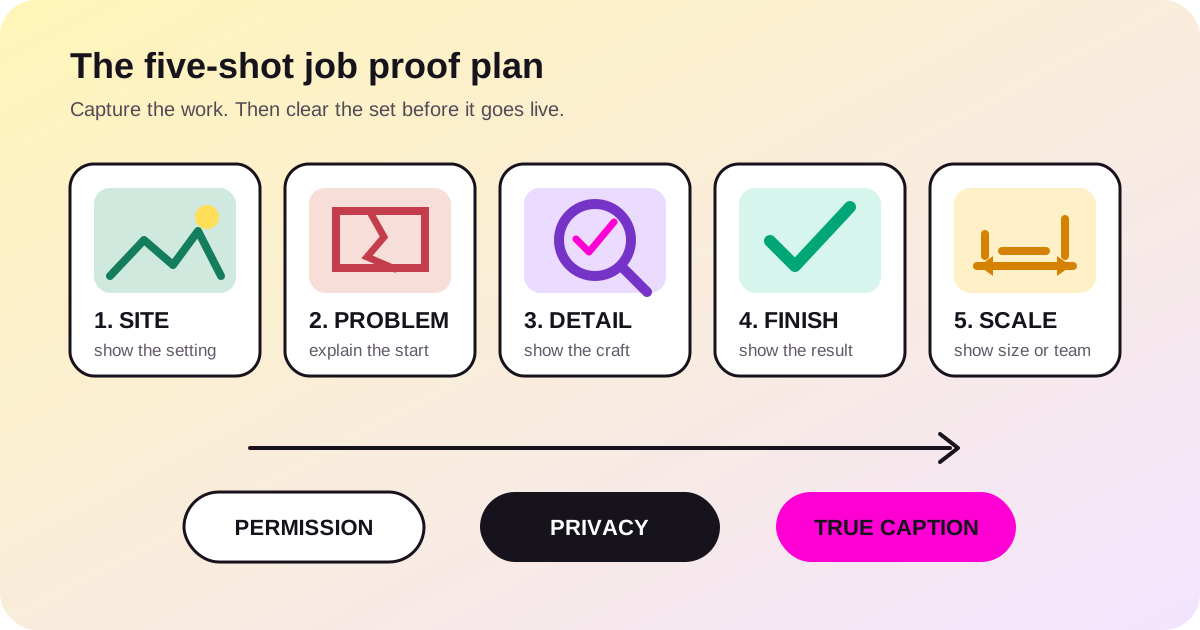
The five photos to capture on a suitable job
This is a field list, not a fixed rule. Some jobs need fewer views. Others need more. The point is to avoid ten near-identical photos that never show the buyer what changed.
- The wider setting. Step back far enough to show the type of site, room or system. Keep the frame tight enough that it does not reveal the street number, neighbour or anything else that is not needed.
- The problem or starting point. Show the cracked fitting, failed surface, poor access or old layout that explains the work. Do not fake damage, move items to make a job look worse or use a different property as the “before”.
- One workmanship detail. Capture the part a careful buyer may not notice from a wide photo: a clean join, straight line, sealed edge, neat cable path or prepared base. Use a detail that honestly relates to your service.
- The finished result. Take it from roughly the same place as the first photo when that makes sense. Clear loose packs and tools. Do not hide faults or edit the result into work the client did not get.
- A scale or team view. Show the size of the finished work or the real team on site. If a person can be recognised, make sure that person has agreed to the planned use. A gloved hand, tool or safe wide view may give enough scale without a face.
Do not force each job into this set. Skip a photo when the site is private or the client is unsure. Skip it if the work is not safe to pause. Leave it out if the shot would expose more than it proves.
Choose the image by the claim it must support
| Website need | Best first choice | What can go wrong |
|---|---|---|
| Show finished work | A real finished job your firm did | A supplier or stock image creates the impression that it is your work |
| Show the firm | A current owner or team photo with consent | An old team photo shows people who no longer work there |
| Explain a process | A safe real photo or a simple labelled diagram | The photo shows an unsafe act or a method you do not use |
| Set the mood | A licensed stock image clearly used as decoration | The page makes the stock property look like your project |
Stock photos are not bad by default. They are weak proof. If a photo is just for style, do not call it a FreshTech client, local job or result. The ACCC says the full sense of an ad matters. That includes its images. A true line on its own does not fix a false page.
Ask before the camera comes out
Consent is easier before the work becomes a sales post. Ask in plain words. Say what you want to shoot. Say where it may appear. State if a person, firm name or address may be shown.
Simple consent prompt: “Can we take a few photos of the work for our website and Google profile? We will leave out your address and private details. We will not show a person’s face unless we agree on that too.”
Keep the answer with the job notes. A yes to a work record is not a yes to a public site. If the planned use changes, ask again.
The OAIC says a photo of a person who can be known may be private data. It also says a clear yes before it is made public is good practice. Privacy Act duties depend on the firm and the case. This guide is not a legal finding for each firm. Use the safe steps and seek help for a high-risk job.
Run a privacy and truth check before upload
Open each image at full size. A small phone preview can hide details that become clear on a large screen.
- People: look for faces, name badges, reflections and family photos in the background.
- Place: look for house numbers, street signs, number plates, access codes, keys and details that point to a neighbour.
- Documents: look for invoices, plans, labels, medical notes, school items and mail.
- Screens: zoom in on phones, tablets, alarm panels, dashboards and computer displays.
- Truth: confirm your firm did the work and the caption does not claim more than the image shows.
- Rights: confirm who took the photo or supplied it and what use was agreed.
Google Business Profile’s rules also say not to post someone else’s private data without consent. Its list has a face in a photo. A good blur can help. A close crop is often cleaner. If the shot cannot be made safe and still prove the work, leave it out.
In Australia, copyright guards a new image as soon as it is made. That does not mean each image on a supplier page, social feed or search result is free to use. Keep the source file and the maker or licence note with the hand-off.
Write captions that help without exposing the client
A caption should tell the buyer what to note. It does not need the client’s name or full address.
Use this plan: service + clear detail + broad area when it helps.
| Weak caption | Better caption | Why it is better |
|---|---|---|
| One more happy client | Damaged tap connection replaced and tested | It states the work, not an unproved feeling |
| Best bathroom in Melbourne | Finished wall tiling with aligned niche edges | It points to a visible detail without a superlative |
| Smith job, 14 Long Street | Switchboard upgrade for an older Fitzroy home | It removes the client and full address |
Use a suburb only if it is true, helps the buyer and has been cleared. Do not make twenty copies of one photo and swap suburb names. That makes weak pages and false local proof.
Prepare the images for the website and Google
Give the file a short, clear name before it reaches the site. switchboard-upgrade-fitzroy.jpg says more than IMG_7842.jpg. Keep the words true. Do not pack the file name with each service and suburb.
Google says to place clear images near text that fits. Use clear file names and good alt text. It also says standard HTML image tags can be found. CSS background images are not indexed as images. None of this can promise a rank. It gives the image and its context a clean path to be read.
Alt text is for the meaning of the image when it cannot be seen. Write what the photo shows in the page’s context. For example: “New switchboard with labelled safety switches after an upgrade.” Do not start with “image of”. Do not repeat a list of suburbs or keywords.
Ask the site builder to weigh image quality against page speed. No one file limit suits each photo and phone. The live image should look clear. It should not make a phone wait for a huge source file.
Keep a clean hand-off the firm controls
Do not leave the only copies on a worker’s phone, in a chat or in the site builder’s account. Put the cleared tradie website photos in a folder the firm controls.
| Keep | What to record |
|---|---|
| Source file | Untouched source file, capture date and photographer |
| Approved copy | Cropped or blurred version cleared for public use |
| Consent | Who agreed, what use was explained and when |
| Context | Service, safe broad area and the detail worth showing |
| Website copy | Filename, caption, alt text and page where it appears |
This note makes later updates safer. It helps a new staff member remove an old team image, find the right finished job and avoid guessing what a photo was meant to prove. Add the photo folder to the wider website maintenance hand-off.
A one-minute check before a photo goes live
- Is this our work, our image or an image we are allowed to use?
- Did the client and each person shown agree to this public use?
- Does the full-size image reveal a person, address, plate, document, screen or access detail?
- Does the caption state only what we can support?
- Is the file in the firm’s folder with consent and context?
- Does the live page show it clearly on a real phone?
If one answer is no or unclear, hold the image. One lost page photo will not hurt a sound firm. A leak of private data or a false claim can.
Common questions
Should tradies use before-and-after photos?
Yes, when both images show the same real job. Show the result in a fair way and clear it for public use. Use the same angle where you can. Do not improve the “after” with an edit that changes what the client got.
Can I show a client’s house without showing them?
Only after you check what the shot shows and what the client agreed to. A house can still show an address, plate, alarm detail or private item. Ask in plain words. Crop it well. Leave it out if safe use is not clear.
Can I use photos from a supplier or manufacturer?
Use them only when the licence or a written yes covers your plan. Make it clear when a shot shows a product, not a job your firm did. Keep the source and consent note.
Do photo filenames and alt text help Google?
They help search tools and people read an image in context. They do not ensure an index or rank. Use short, clear file names, good alt text and nearby copy that tells the true job.
How many photos should a tradie website have?
There is no honest universal number. Use enough current photos to explain the important services and show real proof without slowing the page or repeating the same view. A smaller, cleared set is better than a large folder with no context.
Should each job go on the website?
No. Choose work that matches the services you want to explain and that can be shown safely and truthfully. Keep sensitive, ordinary or poorly documented jobs out of the public set.
Build the proof folder before the gallery
Pick one sound, finished job. Take the five clear views. Check the people and private details. Write one true caption for each cleared image. Then hand the set over with its context.
Use the tradie website acceptance checklist to test the full site. If reviews sit beside the photos, follow our fair Google review request guide.
See all FreshTech guidesSources
- Office of the Australian Information Commissioner: Posting photos and videos, accessed 23 August 2026.
- Australian Government business.gov.au: Copyright, accessed 23 August 2026.
- Australian Competition and Consumer Commission: False or misleading claims, accessed 23 August 2026.
- Google Search Central: Google Images SEO best practices, accessed 23 August 2026.
- Google Business Profile: Prohibited and restricted content, accessed 23 August 2026.
Editorial note: FreshTech Community prepared this guide from current Australian primary sources and official Google documentation. It contains no affiliate link, paid placement, copied project claim, fabricated review, legal conclusion or ranking guarantee.