Google Business Profile service area tradies Australia
Can a tradie use Google Business Profile without a shopfront?
Yes. Use a service-area profile when you travel to customers and do not receive them at your base.
Direct answer
Yes. An Australian tradie can have a Google Business Profile without a public shopfront. Use a service-area profile when you go to the customer and no one visits your base. Google may ask for your real address as proof. You can keep it off the public page. List only the cities, postcodes or areas you serve. Do not use a virtual office, mailbox or fake location.
This is not a loophole. Google made this profile type for plumbers, cleaners and other crews that go to the job. Show the real business, not the place where you wish it would rank.
Google changes its screens and proof options. We checked these rules against Google Business Profile Help on 5 August 2026. Your live profile may show a different set of steps.
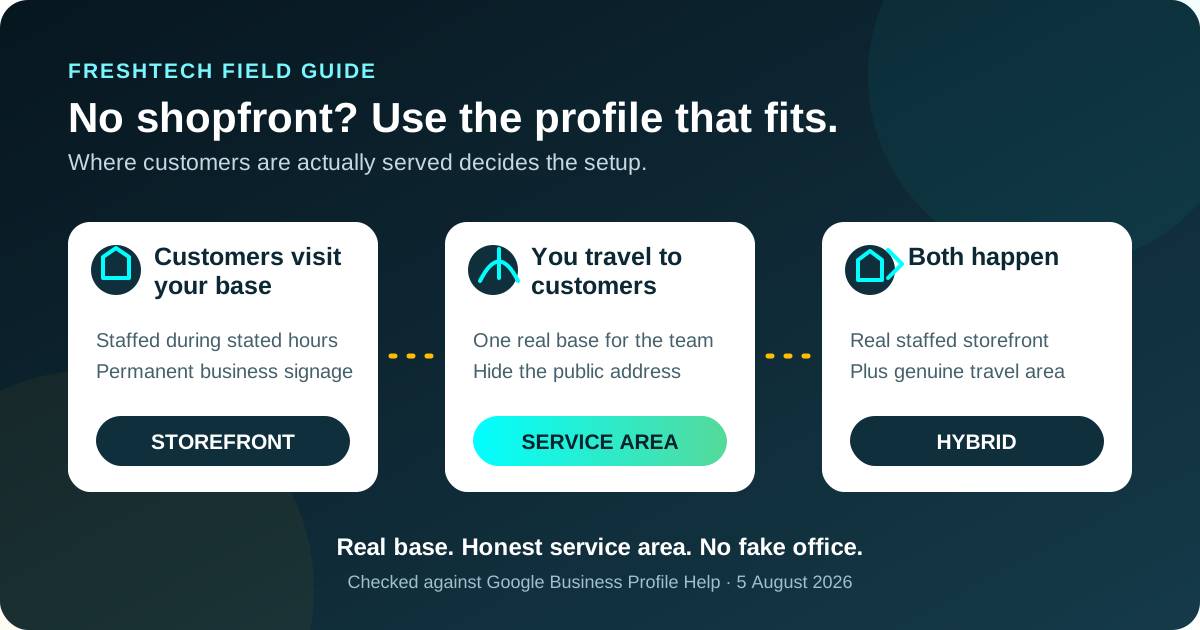
The short rule: storefront, service-area or hybrid
| Real operating model | Profile type | Address shown? |
|---|---|---|
| Customers visit a staffed location during the stated hours. The business has permanent signage. | Storefront | Yes, if the location meets Google's rules. |
| You travel to customers. Nobody is served at your home, shed or office. | Service-area business | No. Hide the street address and list service areas. |
| Customers visit a staffed, signed location and you also travel to them. | Hybrid business | Yes. Add the real service area as well. |
A workshop is not always a shopfront. If clients cannot turn up in the listed hours and get service there, use the service-area model. Your home can be the real base used for proof. It can stay hidden on the public profile.
What counts as a service-area business?
This type of business meets people face to face, but it goes to them. A plumber who works in homes fits. So can a mobile mechanic, cleaner, gardener or sparky. An online lead firm does not count just because it sends work to local crews.
Google says one real base should have one profile for the whole area it serves. A firm may have a profile for each true branch when each branch has its own staff and area. That is not the same as making many suburb profiles for one crew.
Plain rule: one real base and one team usually means one profile. A suburb in your service area is not a new business location.
Do not rent a virtual office to make a second map pin. Google says a virtual office does not count. A shared office needs clear signs and staff from your firm. Those staff must serve clients there in the stated hours.
How to hide a home address and set the profile up
- Check that the firm can have a profile. It must meet clients in person in its stated hours. Online-only brands and lead firms do not count.
- Use the real business name. Enter the name used on the website, invoices, vehicle and other real-world material. Do not add suburb or service keywords that are not part of the name.
- Enter the real base when Google asks. Google may use that address as proof. A P.O. box, remote mailbox or made-up office will not do.
- Turn off the public address. In the profile, choose Edit profile, then Location. Turn off “Show business address to customers” when customers are not served there.
- Add accurate service areas. Choose the cities, postcodes or other supported areas the team actually serves. Google does not use an editable radius for this field.
- Add the real trade, work, hours, phone and website. These facts should match what you do and when people can reach you.
- Do the proof check Google offers. Google picks the method. It may ask for video, phone, text, email, a live call or more than one check.
Hiding the address does not mean the base is fake. It keeps private proof apart from the place shown to the public.
How to choose honest Google service areas
Google now lets this type of profile pick up to 20 areas. It says the full reach should stay within about two hours' drive of the base in most cases. Some firms may cover more. That is not a goal to stretch.
Pick areas where the team can take real work. A short list is easier to keep true. Do not add each big city or each suburb in a state. Do not add a place you only hope to serve one day.
| Choice | Why it is sound or risky | Better action |
|---|---|---|
| Suburbs the crew visits each week | Sound. The list reflects real operations. | Keep it current when travel limits change. |
| A distant city with no staff or base | Risky. A service area does not create a real location. | Add it only when the team genuinely serves it from the real base. |
| A second profile for every suburb | Risky. One service-area business usually gets one profile. | Use one profile with accurate areas. |
| A staffed second branch with its own crew | Potentially sound when it is a genuine operating location. | Check every location against Google's full rules before creating it. |
What to prepare for video verification
Google may ask for a video. The clip must be new, whole and at least 30 seconds long. Record and send it from a phone through the profile. Do not show bank, tax or ID numbers. Keep private facts and other people's faces out of shot.
Plan one uncut walk-through. It should prove three things:
- Where the business operates: show street signs, a building number or nearby landmarks around the real base.
- The business exists: show the tools, equipment, products, workspace, business cards or branded workwear used for real jobs.
- You run it: unlock the work van, use your gear or show a sound business record.
The name in the proof should match the profile. Do not make a sign just for the clip. Do not film gear that is not yours. Google makes the call. Good proof helps, but no guide can promise a pass.
Mistakes that can put the profile at risk
- Showing a home address where no customers are served. Use a hidden service-area address instead.
- Using a virtual office, P.O. box or remote mailbox. These do not create an eligible operating location.
- Adding service keywords to the business name. The profile name should match the real-world name.
- Making duplicate suburb profiles. Service areas belong inside the real profile.
- Claiming hours when nobody can serve customers. Use hours the business can actually support.
- Changing core details casually. Google may ask for more verification after important profile edits.
If Google blocks the profile or an edit, do not make a new profile to dodge the block. Read the note. Fix the facts. Then use Google's stated review or appeal path. FreshTech does not promise a return.
Make the website and Business Profile agree
A service-area profile works best as one part of a consistent public record. Use the same real business name, phone, service areas, hours and core services on the website. Do not publish fake branch pages for places with no branch.
The website can say more than the profile. Show real job photos, work limits, contact paths and licence facts where they apply. List the areas the crew visits. The Google AI search guide for Australian tradies explains why these facts should match. The Google review request guide covers real proof with no rewards or review gate.
A quarterly profile check
- Check that the profile type still matches where customers are served.
- Confirm the home or private base is not shown publicly when it should be hidden.
- Remove service areas the team no longer covers.
- Check the business name, main category, services, phone, hours and website.
- Review owner and manager access. Remove people who no longer need it.
- Open the website on a phone and confirm the same core facts appear there.
- Keep verification material current after a real move, rebrand or vehicle change.
This check is about truth, not endless edits. Change a field when the firm changes. Do not churn the profile to chase a rank trick.
Common questions
Do I need to publish my home address?
No, not when you are a service-area business and customers are not served there. Google may still require the real address for verification. Turn off the public address and add the genuine service area.
Can I use a virtual office for Google Business Profile?
Not as a substitute for a real operating location. Google's guidelines say virtual offices are not eligible. A co-working office needs real signage, staff and customer service during the stated hours.
How many service areas can I add?
Google currently allows up to 20 areas. Use cities, postcodes or other supported areas. The full area should usually remain within about two hours' drive of the base.
Can I make one profile per suburb?
Not for one team working from one base. A service-area business generally gets one profile for the full area it serves. Separate profiles need separate eligible locations and operations.
Does hiding the address hurt Google rank?
Google's published rules require a service-area business to hide an address where customers are not served. This guide makes no ranking promise. Following the correct profile type is safer than displaying an ineligible location to chase visibility.
Give Google one true version of the business
The profile and website should describe the same name, work, service area and contact path. Start with the facts. Then make them easy to read.
Use the tradie website acceptance checklist before paying for a site.
See FreshTech website optionsSources
- Google Business Profile Help: Manage your service areas for service-area and hybrid businesses, accessed 5 August 2026.
- Google Business Profile Help: Manage your business address, accessed 5 August 2026.
- Google Business Profile Help: Guidelines for representing your business on Google, accessed 5 August 2026.
- Google Business Profile Help: Verify your business with a video recording, accessed 5 August 2026.
- Google Business Profile Help: Business eligibility and ownership guidelines, accessed 5 August 2026.
Editorial note: FreshTech Community prepared this guide from current official Google sources. It contains no paid placement, affiliate link, fake location advice, fabricated result or ranking guarantee. Google's policies and interface can change.