Google reviews for tradies Australia
How should a tradie ask customers for Google reviews?
Use one fair rule for genuine customers. Make the link easy. Leave the rating and words entirely up to them.
Direct answer
Ask genuine customers with the same short, neutral message after a real job. Give them the direct Google review link. They choose whether to post, what to write and what rating to leave. Do not offer a reward or ask only the happy customers. Do not request five stars, draft the review or send unhappy customers down a private-only path.
That answer is less flashy than a “five-star review hack”. It is also safer to run each week. Google lets a business ask for a review after a real job. Its rules ban rewards, pressure, set words and asking only people likely to be happy.
Australian Consumer Law adds another line. A business must not create or arrange fake or misleading reviews. The Australian Competition and Consumer Commission also warns about hiding fair bad reviews. That can mislead people.
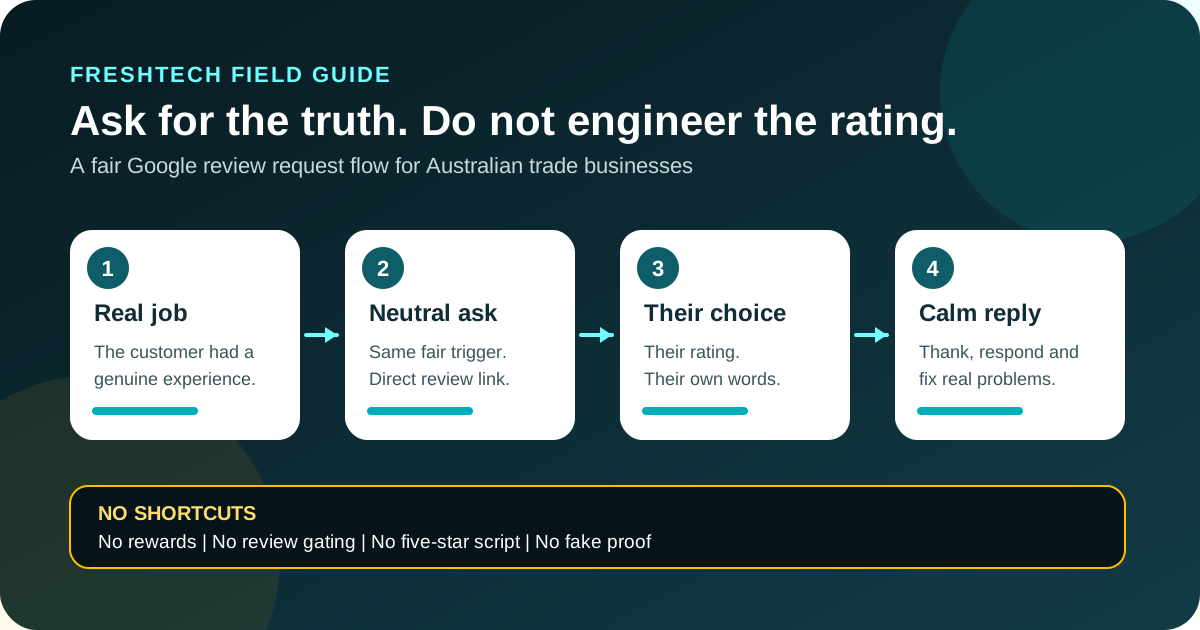
The five-part rule for Google review requests
- Real job. Ask only someone who genuinely dealt with the business or received the service.
- Fair trigger. Use the same trigger after each real completed job. Do not use a mood check to filter out unhappy customers.
- Neutral words. Ask for an honest review. Do not ask for five stars, certain phrases or praise for a named worker.
- No reward or pressure. Do not trade a discount, gift, refund, competition entry or favour for a Google review.
- Open response. Thank good reviews, handle criticism calmly and report only content you genuinely believe breaks policy.
This rule is deliberately boring. That is the point. A repeatable request should survive a busy week, a complaint and a staff handover without turning into rating manipulation.
What Google allows and what it bars
| Practice | Google policy position | Safer action |
|---|---|---|
| Ask after a genuine job | Allowed when the business does not influence the rating or content. | Send one neutral request after the job reaches a clear completed stage. |
| Ask only people who say they are happy | Google bars selectively soliciting positive reviews. | Use the same request rule no matter what you think they will say. |
| Offer a discount or gift | Google treats incentives in exchange for reviews as fake engagement. | Offer no benefit for posting, changing or removing a review. |
| Ask for five stars or certain words | Merchants must not pressure reviewers or request specific content. | Ask only for an honest account in the customer's own words. |
| Family, staff or mates post praise | Conflicts of interest can make content biased and against policy. | Keep the request to real customers who had work done. |
Google's platform rule is stricter than the general incentive guidance. The ACCC explains when incentivised reviews may risk misleading consumers and how incentives must be handled. Google bans incentives in exchange for Google Maps reviews. For a Google review request, the simple rule is no incentive.
The Australian law and message-permission boundaries
The ACCC says a review should stand on its own. It should show the real view of a person who used the service. A business must not make a fake or misleading review. It must not ask someone else to make one. Reviews can also mislead when a business edits them or hides fair bad feedback. The same risk can arise when it does not reveal a business link.
business.gov.au says it is okay to ask customers to review a business. The site's rules and the law still apply. It also says you need the customer's okay before a follow-up email that asks for a review.
A review request may be sent by email or SMS. The Australian Communications and Media Authority sets the spam rules. If the request is a commercial message, those rules will often call for consent, clear sender details and a way to opt out. The exact rule depends on the message and its context. Check the current ACMA guide or get advice before you set up an automatic run.
Plain rule: permission to contact a customer about a job is not a blank cheque for ongoing marketing. Keep the request relevant, identify the business and honour opt-outs.
A seven-step Google review workflow for a trade business
- Define “completed”. Pick a real business event: final walkthrough, paid invoice or confirmed handover. Do not trigger the request while work or a dispute is still open.
- Set a fair request rule. For example, ask after each completed home job when the customer had work done and has not been asked before.
- Get the official review link. Open the current Google Business Profile. Select the reviews area, then use “Get more reviews” to copy the link. Google also provides a QR code from a computer browser.
- Use neutral wording. Ask for an honest review, not a positive review. Do not supply sentences to paste or tell the customer which staff name to mention.
- Send once, then one light reminder at most. A request is optional. Stop if the customer declines, opts out or has an unresolved concern.
- Keep private feedback open to all. Give each customer the same public review option. A second contact path can help fix a problem. It must not replace the review link just for unhappy people.
- Respond without publishing private job details. Thank reviewers, acknowledge concerns and move account, address, health or dispute facts to a private channel.
Do not set a staff target such as “five reviews each this week”. Google specifically lists staff quotas and requests for content that names a staff member as disallowed pressure. Measure whether the workflow ran fairly, not whether it produced a chosen rating.
Neutral Google review request examples
These are starting points, not magic conversion copy. Edit the sender details and contact rules for the business. Do not add a star target or a reward.
SMS example
Hi [first name], thanks for choosing [business name] for [job]. If you'd like to share an honest Google review, here's the link: [review link]. No pressure. Your feedback helps us check our work. [sender/business]. Reply STOP to opt out.
Email example
Subject: Honest feedback on your [job]
Hi [first name], thanks for having [business name] complete the [job]. If you'd like to share your experience, you can leave an honest Google review here: [review link]. The rating and words are entirely up to you. If anything still needs attention, reply to this email so we can look into it. Cheers, [name and business].
Receipt or QR-code example
Review your experience with [business name]. Scan the code to leave an honest Google review. Feedback can be positive, mixed or negative.
Do not write “Scan for five stars”, “Help us keep our perfect rating” or “Tell Google that [worker] was great”. Those phrases try to influence the rating or content.
Review gating versus a fair feedback choice
Review gating means screening customers by mood and sending only the happy group to the public review page. A common form asks, “Were you happy?” A yes gets the Google link. A no gets a private form. Google does not allow this split.
| Step | Review gating | Fair workflow |
|---|---|---|
| Who sees the Google link? | Only customers predicted to be positive. | Each customer under the same completed-job rule. |
| Private feedback | Used to divert negative sentiment away from Google. | Available as an extra contact path without removing the public option. |
| Message | Asks for praise, five stars or chosen wording. | Asks for an honest account in the customer's own words. |
| Business measure | Chosen rating, quota or review spike. | Requests sent fairly, opt-outs honoured and issues followed up. |
How to respond after the review arrives
Positive review
Thank the customer briefly. Do not reveal their address, invoice, job price or other private details. Avoid pasting the same robotic paragraph under every review.
Mixed or negative review
Note the concern without starting a public fight. Ask the reviewer to call or email. Fix what can be fixed. business.gov.au says to reply soon, stay calm and take the full talk to a direct channel.
Suspected fake review
Check the job notes and site rules before you make a claim. Report the review to Google if there is a real policy reason. The ACCC says a business needs good grounds before it treats a review as fake or misleading. A bad opinion is not proof of a fake review.
A monthly review-process check
- Did every request follow the same genuine-customer rule?
- Did any message ask for a rating, praise or staff name?
- Did anyone offer a discount, gift, refund or competition entry?
- Were consent, sender details and opt-outs handled properly?
- Did the review link still open the correct Business Profile?
- Were private customer and job details kept out of public replies?
- Did repeated criticism point to a real service problem to fix?
A good review process does not hide bad news. It gives the business a fair public record. It also shows where the real work needs care.
Common questions
Can a tradie ask for a five-star Google review?
Do not ask for a set rating. Google allows a neutral request after a real job. It does not allow you to shape the rating or words.
Can I offer a discount for a Google review?
No. Google's policy bars rewards in exchange for a review. This includes discounts, payments, free goods or free work. It also covers a change to or removal of a review.
Can I ask only happy customers?
No. Google bars selectively soliciting positive reviews. Use the same fair request trigger for each real customer.
Can I write a review for the customer to approve?
Do not draft the words or rating. The review should be the customer's own account. The ACCC has taken action over a service that let firms draft reviews. The service then posted them when the customer did not reply.
Should I put Google reviews on my website?
Only use genuine reviews with accurate context and permission where needed. Do not edit away negative parts or make a small set look like the whole customer record. Keep any structured data consistent with visible, eligible content.
Make the public facts agree
Reviews are one piece of proof. The business name, service area, phone, work and website still need to tell the same true story.
Read how to help Google AI and ChatGPT understand a trade business. Check whether a website has a real job to do. Or run the tradie website acceptance checklist.
See FreshTech website optionsSources
- ACCC: Online reviews for products and services, accessed 4 August 2026.
- business.gov.au: Online reviews, accessed 4 August 2026.
- Google Business Profile Help: Create a Google link or QR code to request reviews, accessed 4 August 2026.
- Google Maps policy: Prohibited and restricted content, accessed 4 August 2026.
- ACMA: Email and SMS unsubscribe rules, accessed 4 August 2026.
Editorial note: FreshTech Community prepared this guide from current official sources. It contains no paid placement, affiliate link, fabricated result, copied review, review incentive or ranking guarantee. It is general information, not legal advice.